

One of the frequently asked questions we’ve encountered over and over again is…”How do I transfer my wallet credit to another person”?
The answer to that is what we will be covering in this post, and this can be done with just some few steps.
Step 1: Login to your account
This is pretty obvious.
Before you can transfer wallet to another user, you have to be logged into your account. To log into your account, all you simply need to do is to go to https://zumahia.com/login
Then you fill in your user and password and login.
Step 2: Go to Your Wallet Page
After logging in, look at the site navigation menu and click on “my wallet”.
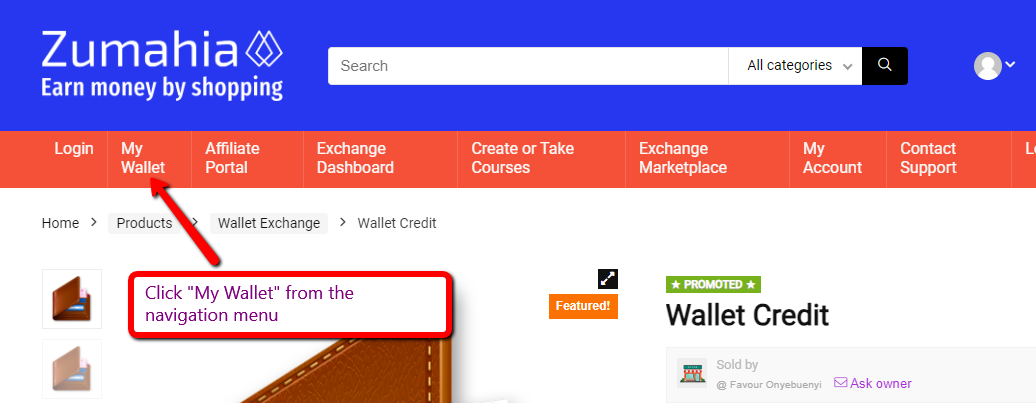
When you click on “My Wallet”, you will be taken to your wallet page where you’ll see your balance, as well as as the list of wallet transactions you’ve made.
Step 3: Click on Wallet Transfer in your wallet page
Right there in your wallet page, you’re going to see a menu called “Wallet Transfer”. Click on it.
When you click on it, the page will load for you to provide details about the transfer you want to make.
These details will be the email address you want to transfer the wallet to, the amount of wallet you want to transfer, and the reason for transfer.
Step 4: Type the email address you want to transfer the wallet to
If you’ve recently made a sale, you’ll see the email address of the buyer in the email that was sent to you. Alternatively, you can also see the email address of the buyer from the order page on your dashboard.
Copy the email address and type it in the space for email address in the wallet transfer page.
Next, enter the amount you want to transfer. This will be the amount that the buyer paid for.
In the space for reason to transfer, you can write wallet delivery, or you leave it empty.
Step 5: Click the “Proceed With Transfer” button
After filling up the necessary details, click the proceed with transfer button on the page, and the wallet amount will be transfered to the person.
That’s all.